FIG_002.10
Projects/Tools
待看
待看 collects the unfinished work from every Grok Build project into one list, so after switching tasks I can see what is waiting, mark it seen, or resume it where it stopped.
- Role
- Design and development
- Period
- 2026.09
- Platform
- macOS menu bar app, interface in Chinese
- Status
- Shipped
01Context
I run AI coding sessions in several projects at once. Switching between them, I lose track of which outputs I never read and which goals were cut off halfway.
02Decisions
- 01
Each project keeps its own history, so nothing shows the whole picture.
One list scans every working directory and keeps only the top level sessions that still need me: interrupted, paused, or finished but unread.
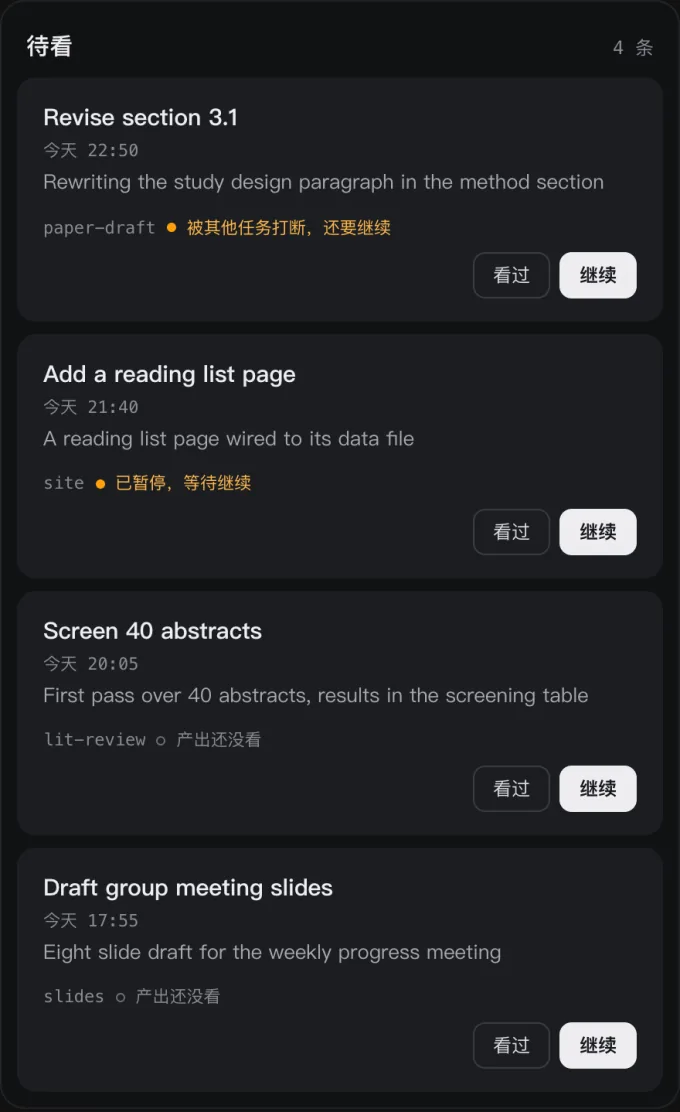
Example items. - 02
A list that only grows stops being read.
Each item has two actions. Seen removes it for good; Continue opens the terminal in that project and resumes the session where it stopped.
03Outcome
- Opening takes 200 milliseconds and closing 120; a seen item fades out and the list closes up within 180.
- Tests open a real WKWebView window against a temporary Grok home, so they never touch the real list.
SwiftWKWebViewJavaScriptmacOS